


Kik — Messaging & Chat App
2.7423.88K Reviews
App Specs
- Version
- 17.21.0.35551
- Updated On
- License
- Free
- Downloads
- 100,000,000+
- Developer
- MediaLab AI - Kik
- Categories
- Communication
- Platform
- Android, iOS
Screenshots




 Analysis by AppCompare
I have always seen Kik as a messaging app that sits slightly apart from the usual phone-number-first services. It is built for chatting, meeting people through shared conversations, and joining a more casual social rhythm than the one many people associate with work-oriented messengers. After spending time with it, my impression is mixed but clear: Kik is easiest to appreciate when you want a flexible chat identity and a relaxed way to keep conversations moving, but it is not the app I would choose for every contact or every kind of private communication.
The app comes from MediaLab AI - Kik and belongs to the communication category. It is free to install, although purchases inside the app range from $0.99 to $99.99 per item. Its mature 17+ rating is important rather than decorative: the social environment can be more unpredictable than a simple family group-chat tool, so the right audience and sensible boundaries matter.
Its long history also explains why the experience can feel familiar rather than experimental. Kik was released on June 25, 2010, and the current Android version is 17.21.0.35551, supporting devices running Android 7.0 or later. The app has passed 100 million installs, while its average rating sits at 2.7 from around 2.4 million ratings. That combination tells me it has a very large user base, but also that popularity should not be confused with universal satisfaction.
How I use Kik for an ordinary week of chatting
I find Kik most useful when I treat an ordinary week as a handful of conversations to check, rather than a stream I need to monitor constantly. In this section, I’ll focus on how I decide which chats deserve a reply and how I keep a casual exchange from taking over the day. That everyday rhythm leads naturally to the settings and habits that make the app easier to manage.
The basic conversation flow
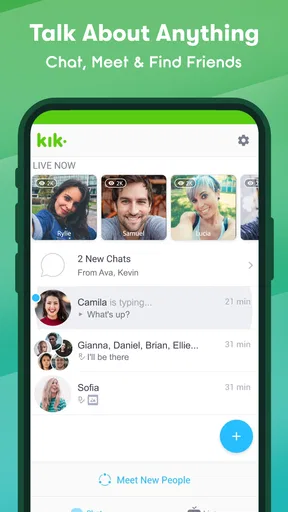
My normal starting point is simple: open the app, check existing conversations, answer anything that needs a quick reply, and then move to the people or communities I actually want to engage with. Kik works best when I treat it as a conversation hub instead of expecting it to replace every communication tool on my phone.
The first useful habit is keeping the chat list intentional. If I accept every conversation request or allow every new interaction to remain visible, the inbox becomes noisy quickly. I prefer to answer active chats, remove attention from conversations that have naturally ended, and avoid treating a crowded list as a sign that the app is working well. This makes the app feel considerably lighter.
A realistic example is a group of friends organizing a weekend plan. One person suggests a place, another asks about timing, and someone else sends a last-minute change. Kik is convenient for that kind of informal back-and-forth because the conversation remains more spontaneous than a formal planning tool. I can check the thread, respond when I have a moment, and return later without turning the exchange into a structured project.
Worth Reading Before You Choose

Flipboard Shows What News Apps Must Do Beyond the Feed

Switching to Android Auto Means Rethinking Your Driving Routine

Google Calendar Makes a Crowded Week Easier to Manage

Ludo King Makes the Most of the Minutes Between Plans

Baby Panda World Brings Quick Play to Modern Phones, but Its Game Library Feels Busy

ESPN’s Live Game View Makes Following Close Games Easier
That same looseness is also the main weakness. If the conversation involves appointments, important documents, detailed work instructions, or information I cannot afford to lose in a fast-moving thread, I prefer email or a more structured collaboration service. Kik is good at keeping people talking; it is not designed to be my filing cabinet.
Choosing the right people to chat with
I would not recommend approaching the app as an endless stream of strangers. The better workflow is to begin with people I already know, then expand carefully through communities or conversations where the purpose is obvious. A recognizable context makes it easier to judge whether a new contact is worth answering.
For younger users, the mature rating should be taken seriously, and adults should still avoid assuming that every profile represents exactly what it claims. I would keep personal details out of early conversations, avoid sending anything I would regret seeing outside the chat, and leave interactions that become pushy, sexual, manipulative, or financially suspicious. Those are not complicated rules, but they make a major difference in an app built around open social contact.
One practical trick is to separate “people I know” from “people I am still evaluating” in my own behavior, even if the app does not present that distinction as a formal workflow. I answer familiar contacts normally, while keeping new conversations brief until the person proves consistent. That prevents the common mistake of giving a new chat the same trust as a long-standing friendship.
What the free model means in practice
The free entry point makes trying Kik easy, and I can use the central messaging experience without committing money first. That makes sense for someone who wants to see whether friends are already active there. I would not, however, make an in-app purchase simply to solve a problem that is really about poor chat organization or unsafe contacts.
Purchases are part of the experience, so I pay attention before confirming anything. My rule is simple: first understand what an item changes, then decide whether it improves a repeated habit rather than merely satisfying curiosity for a few minutes. The listed purchase range extends from less than a dollar to amounts close to one hundred dollars per item, which is wide enough that casual tapping deserves caution.
How Kik compares with familiar alternatives
Compared with phone-number-centered messengers, Kik can feel more comfortable for users who want a separate chat identity or who do not want every conversation tied to their regular calling and contacts routine. That is its clearest personality difference. On the other hand, services built around existing phone contacts may be easier when the goal is simply to find family members, colleagues, or established friends.
Compared with large social networks, Kik feels more focused on direct conversation rather than a public profile and a broad content feed. That can be refreshing if I want to talk instead of scroll. Compared with work chat tools, it is less suitable for searchable records, formal responsibilities, and organized team information. The best choice depends on whether the conversation is social, personal, or operational.
Settings and habits that make the experience more manageable
Before I explore new conversations, I like to settle on a few boundaries: what I’m comfortable sharing, which alerts deserve my attention, and when I’m willing to respond. Those choices matter more than trying to tune every setting at once, especially in a social app where contact can be open-ended. Next, I’ll look at small repeatable habits that help frequent users move through chats with less friction.
Start with notifications, not decoration
The first settings I check are notification controls. Messaging apps become tiring when every small activity demands immediate attention, especially when several conversations are active at once. I prefer alerts that help me notice direct replies without allowing the app to interrupt every quiet moment.
A useful routine is to silence or reduce attention for chats that are active but not urgent, then keep a closer eye on conversations that genuinely matter. I also avoid using notification volume as a substitute for organization. If the inbox feels overwhelming, changing alerts may help, but the deeper fix is deciding which conversations deserve a place in my daily routine.
This is one of the most important differences between a new user and an experienced one. A newcomer often leaves every default behavior untouched and then blames the app for becoming noisy. I check the available notification options early, test them for a day, and adjust based on how often I actually need to respond.
Review privacy and contact choices before social exploration
Before exploring broader chat opportunities, I look through the account and privacy-related controls available in the app. I want to understand who can reach me, what information is visible through my profile, and how easily I can stop an unwanted interaction. The exact labels can change between releases, so I focus on the purpose of each control rather than memorizing a particular menu path.
I keep my profile deliberately modest. A nickname and a general interest can be enough to start a conversation; a full name, workplace, daily routine, or identifiable location is unnecessary for most casual chats. This is a small adjustment, but it reduces the amount of information a stranger can combine from a short conversation.
If someone becomes uncomfortable, I do not negotiate for too long. I use the available blocking or reporting choices and move on. The important habit is acting early, before a minor annoyance becomes a repeated interruption. An app can provide controls, but they only help when I use them decisively.
Keep the app and device in a sensible state
Because the current release supports Android 7.0 and later, compatibility is broad, but that does not mean every older phone will feel equally smooth. On an aging device, I keep enough storage free, close unnecessary background activity, and install updates through the normal app-store process. If a chat app behaves strangely, I first restart it and check whether the device itself is under strain before assuming the account is at fault.
I also avoid clearing app data casually. A person who treats that option like a routine cleanup button may create an avoidable login or setup problem. My safer approach is to use ordinary in-app account controls first and reserve more drastic device maintenance for situations where I understand what may be removed.
Another good habit is checking the account I am actually using before changing settings. This sounds obvious, but social apps often contain several profiles, old usernames, or conversations that look similar at a glance. A few seconds of attention prevents changing the wrong account or replying from an identity I no longer intended to use.
Use repeatable conversation rules
I get more value from Kik when I establish a few personal rules. I do not leave important plans buried in a busy thread, I do not send sensitive information to a new contact, and I do not feel obliged to answer instantly just because a notification appears. These rules reduce pressure without requiring complicated features.
For recurring groups, I like to make the first message of a new plan specific: what is happening, when it is happening, and what answer I need. That keeps the thread from filling with vague replies. If the plan changes, I state the change clearly instead of assuming everybody has read the latest messages. This is a small communication technique, but it works especially well in fast casual chats.
Faster patterns for people who use Kik every day
When I use Kik often, I get more from it by making messages easy to answer: I put the question or key change up front, then leave the thread alone once everyone has what they need. I also reserve longer replies for a moment when I can give them proper attention. These patterns help with speed, but they do not turn a casual chat list into a formal record, which is where the app’s limits become clearer.
Turn the inbox into a short action list
I think of the conversation list as an action list rather than a history of every person I have ever met. When I open Kik, I deal with chats in three passes: urgent replies, conversations I want to continue, and everything that can wait. That simple order keeps me from spending ten minutes jumping randomly between threads.
For a message that needs a longer answer, I mentally mark it for a later session instead of writing a rushed response. The benefit is not a special feature; it is consistency. I am less likely to misunderstand a question, and I avoid sending several fragmented messages when one clear reply would do.
I also try to close conversational loops. If a friend confirms a time, I acknowledge it and stop adding unnecessary messages. If a group decision is complete, I let the thread rest. This keeps the chat list calmer and makes genuinely new activity easier to notice.
Use short messages with a clear purpose
Kik’s informal atmosphere encourages quick exchanges, but quick does not have to mean vague. I get better results when each message has one obvious purpose: asking a question, confirming a detail, sharing a link or image, or changing a plan. When I combine several unrelated topics in one burst, the other person may answer only the easiest part.
For group conversations, I put the key detail first. “Meeting at seven instead of six” is easier to catch than a long explanation that reveals the change at the end. This is particularly valuable when people are reading from notifications or returning to the chat after a break.
Another useful pattern is summarizing after a long exchange. I do not need a formal note-taking system; one final message with the agreed time, place, and next step can prevent several rounds of confusion. That is where Kik can support real-life coordination, provided I supply the structure myself.
Protect attention without abandoning people
There is a difference between being available and being constantly reachable. I use notification choices and personal response windows to protect work, sleep, and travel time. Friends who need something urgent can use a channel we have already agreed on, while ordinary conversation can wait until I am ready.
This approach also helps me judge whether Kik fits my communication style. If I need every message to produce an immediate answer, the app may encourage unhealthy habits. If I am comfortable with asynchronous conversation and occasional bursts of activity, it becomes much easier to enjoy.
Be deliberate with media and personal information
Casual chat often leads to photos, voice messages, or other personal material. I pause before sending anything that reveals a location, a routine, or another person without their permission. A message can feel temporary while I am composing it, but the recipient can still save, forward, or misunderstand it.
I am especially careful in conversations that moved quickly from a friendly introduction to requests for money, account access, private images, or urgent favors. A polished profile does not prove trustworthiness. My practical test is whether the person respects a reasonable boundary. If they react badly to a simple “no,” I end the conversation.
Where the app reaches its limits
I like Kik for informal conversations, but I would not stretch that into a claim that it suits every audience or task. The open social feel calls for judgment, and fast-moving chats are a poor home for details that need dependable organization. In this last section, I’ll draw the line between the situations where I’d keep using it and those where a more structured or controlled alternative makes more sense.
It is not my choice for formal records
Kik’s strength is immediacy, but that becomes a limitation when I need dependable organization. I would not use it as the sole record for a work assignment, a legal discussion, a medical instruction, or a complicated event with many changing details. A more structured service is better when messages must be searched, categorized, exported, or tied to an official account.
Likewise, I would not expect it to replace a dedicated group-management tool. If a community needs roles, moderation workflows, permanent reference material, or clear archives, the casual chat format starts to feel improvised. Kik can host conversation, but the organizer has to create the order manually.
The social openness requires judgment
The mature 17+ audience makes sense because not every conversation will feel suitable for everyone. I would skip Kik for a child, and I would be cautious even with a teenager who is not prepared to handle strangers, pressure, or unwanted material. Adults who dislike open-ended social contact may also find the environment more effort than it is worth.
This is not an argument that every interaction is unsafe. It is a reminder that the app rewards active judgment. I need to choose contacts carefully, use boundaries early, and understand how to leave a conversation. Someone looking for a completely controlled family messenger would be better served elsewhere.
The rating reflects a divided experience
An average rating of 2.7, drawn from around 2.4 million ratings and roughly 424 thousand written reviews, suggests that many users have encountered frustrations alongside the app’s large reach. I do not treat that score as a complete verdict, because messaging apps are heavily affected by device conditions, contact availability, expectations, and individual experiences. Still, it is a reason to install with realistic expectations rather than assuming the large install base guarantees a perfect fit.
The same tension appears in my own assessment. Kik can be enjoyable when my friends are already there and I keep the social side intentional. It is much less compelling if I am installing it without a clear group, expecting a polished replacement for every messenger, or hoping that the app will organize conversations for me automatically.
Who should choose something else
I would point a privacy-focused user toward an alternative after comparing the specific privacy controls and social model they need. I would recommend a work-oriented platform for teams, a family-centered messenger for controlled contact lists, and a phone-based service for people who simply want to reach existing contacts with minimal setup.
I would also skip Kik if the main goal is a public content feed, professional networking, or long-term document sharing. Those tasks ask for different foundations. Kik is most convincing when the priority is relaxed conversation with a known circle or carefully selected social contacts.
My verdict after building a repeatable routine
After using the app with a more deliberate workflow, I understand both its appeal and its boundaries. The best experience comes from combining a tidy chat list, restrained notifications, a modest profile, careful contact choices, and clear messages. None of those habits is flashy, but together they make the difference between a manageable messenger and a distracting social inbox.
I also appreciate that Kik does not force me into the same communication pattern as every phone-number-first alternative. For some people, that separate identity and casual atmosphere will be the main reason to stay. For others, the lack of formal organization and the need for stronger personal filtering will outweigh that benefit.
My recommendation is conditional but positive: try Kik if your friends or chosen communities already use it, you want informal conversations, and you are willing to manage your own boundaries. Keep sensitive or important records somewhere more appropriate, review the settings before opening the app to wider social contact, and do not spend money until you know exactly what value an item adds to your routine.
For me, it works as a lightweight social messenger rather than an all-purpose communication system. The free starting point makes experimentation reasonable, and its broad Android support helps many people get started. But the mature audience, uneven user sentiment, and open-ended social nature mean that the right question is not whether Kik is universally good. The better question is whether its relaxed chat style matches the people I want to reach and the level of control I expect.
If the answer is yes, I can recommend Kik as a useful addition to my messaging setup. If I need strict privacy expectations, formal records, professional organization, or a tightly controlled family environment, I would choose a different tool and avoid forcing this one into a role it was never meant to fill.
Pros
- Simple interface makes one-to-one and group chats easy to manage.
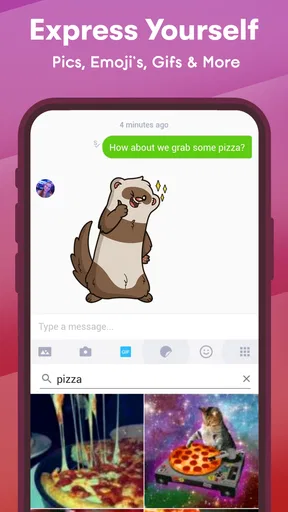
- Supports multimedia messages
- including photos
- videos
- stickers
- and GIFs.
- Username-based accounts can help avoid sharing a personal phone number.
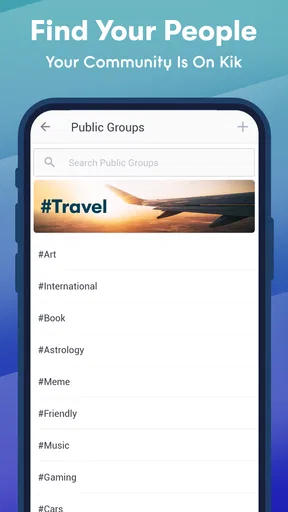
- Public group chats offer opportunities to meet people with similar interests.
- Available on Android and iOS
- making cross-platform chatting convenient.
Cons
- Public groups may expose users to spam
- inappropriate content
- or unwanted messages.
- Some useful features and content may depend on in-app purchases or promotions.
- Message delivery and notifications can be inconsistent on certain devices.
- The app may use considerable battery and mobile data during media-heavy chats.
- Privacy depends heavily on careful settings and avoiding contact with unknown users.
FAQs for Kik — Messaging & Chat App
What is Kik — Messaging & Chat App used for?
Kik is a messaging application designed for chatting with friends, meeting new people, and participating in conversations through usernames rather than requiring a phone number. After creating an account, users can send text messages, share photos and videos, use emojis, and interact in group chats. Its username-based system can be convenient, although users should still be careful about who they contact.
Does Kik require a phone number to create an account?
One of Kik’s main features is that registration is generally based on a username, email address, and password instead of requiring users to provide a phone number. This can offer more privacy and make it easier to chat without revealing your mobile number. However, users should choose a unique username, protect their login details, and avoid sharing personal information with unfamiliar contacts.
Is Kik safe for children and teenagers?
Kik includes messaging and discovery features that may allow users to communicate with people they do not already know. Because of this, parents and teenagers should use caution, review privacy settings, and avoid sharing real names, addresses, school details, private images, or other sensitive information. Younger users may need supervision, since online conversations can involve unwanted messages, inappropriate content, or attempts at manipulation.
What features does Kik offer for chatting and communication?
Kik supports one-to-one conversations and group chats, along with multimedia sharing such as images, videos, emojis, and other message content depending on the current app version. Users can connect through usernames, making the service different from apps centered on phone contacts. The experience is primarily focused on casual messaging, but available features and community tools may change through updates.
Is Kik free to download and use?
Kik can generally be downloaded and used without paying a subscription fee for its core messaging functions. Nevertheless, using the app requires an internet connection, so mobile data charges may apply when using cellular networks. Some optional features, promotions, or third-party content may have separate conditions. Before downloading, users should check the current Google Play Store or Apple App Store listing for pricing and availability.


